


CarSole: Car Dashboard
4.429.00 Reviews
App Specs
- Version
- 18
- Updated On
- License
- Free
- Downloads
- 50,000+
- Developer
- Mor Tosbaa Mobile
- Categories
- Personalization
- Platform
- Android
Screenshots
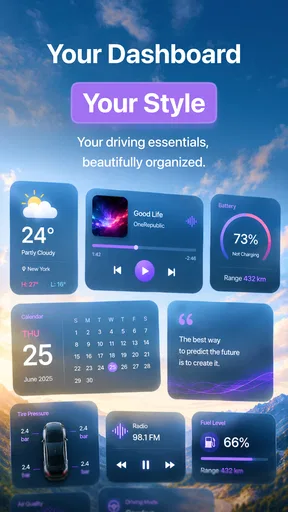
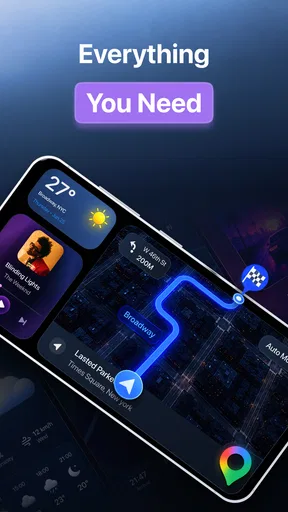
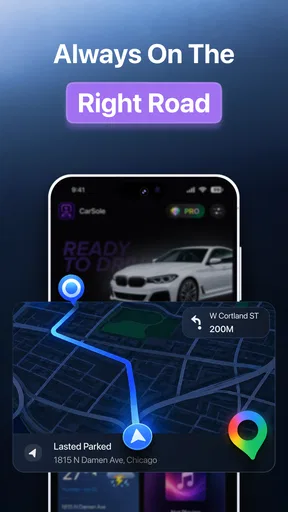
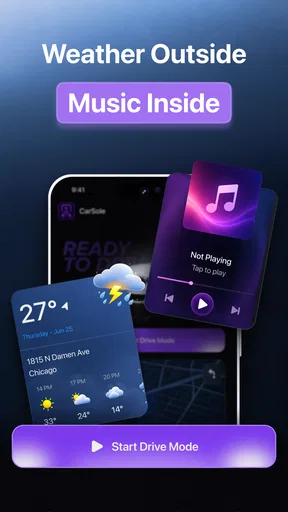
 Analysis by AppCompare
I spend enough time in the car to notice the difference between an interface that helps and one that becomes another distraction. CarSole: Car Dashboard is a free personalization app from Mor Tosbaa Mobile that takes a focused approach to driving: it is built around media playback and audio controls rather than trying to replace every function on a phone. After using it as a dashboard companion, I found its appeal fairly clear. It is most useful when I want large, reachable controls and a simpler way to manage sound while driving, but it is not automatically the best choice for every car or every phone.
The app has a 4.5 average from around 5.5 thousand ratings, with more than 50 thousand installs. Those figures suggest that it has found a practical audience, although they do not remove the need to check whether its dashboard style matches your own setup. It is rated for Everyone, runs on Android 7.0 and later, and the current release is version 18. The app is free to start, while optional in-app purchases range from $0.99 to $39.99 per item.
What the dashboard experience feels like in everyday use
The first thing I noticed is that CarSole makes more sense as a driving layer than as a general phone launcher. Its purpose is narrow: keep media playback and audio controls close at hand while you are on the road. That focus is useful because a dashboard should not make me hunt through ordinary phone menus for the action I need. I would rather see a dedicated driving-oriented screen than unlock the phone, open an audio app, find the right control, and then return my attention to traffic.
That simplicity also defines the app’s limits. If you are looking for a complete navigation replacement, a broad automotive operating system, or a tool that manages every connected-car function, this is probably not the right expectation. CarSole is better understood as a personalization app for people who want a more convenient media-control surface in the vehicle. The distinction matters because it prevents disappointment: its value comes from reducing friction around audio, not from turning an ordinary phone into a full infotainment console.
In a realistic morning commute, I would use it before pulling away, select the audio I want, and leave the dashboard view available for quick adjustments. A passenger could also use it to change playback without navigating the phone’s normal interface. That scenario shows where the design earns its place: repeated, small actions become easier when the controls are presented in a driving-friendly context.
Why perceived speed matters more than feature count
For this kind of app, speed is not just about how quickly a screen opens. What matters is how soon I can recognize the control I need and complete an action without unnecessary taps. A dashboard that contains fewer distractions can feel faster than a more powerful alternative filled with menus. CarSole’s focused purpose gives it a sensible starting point, especially for someone who mainly wants audio control rather than a long list of vehicle tools.
I would still judge the experience in the first few minutes of real use rather than relying on the store summary. Phone models differ, media apps behave differently, and a dashboard’s usefulness depends on how smoothly it fits into the existing routine. Before driving, I would open the app, confirm that the controls are visible, and test changing playback while the car is stationary. That small check is more valuable than discovering an awkward workflow after setting off.
Worth Reading Before You Choose

EA SPORTS FC Mobile 26 Is a Bigger Football Game, but It Takes Time

Flipboard Shows What News Apps Must Do Beyond the Feed

Switching to Android Auto Means Rethinking Your Driving Routine

Google Calendar Makes a Crowded Week Easier to Manage

Ludo King Makes the Most of the Minutes Between Plans

Baby Panda World Brings Quick Play to Modern Phones, but Its Game Library Feels Busy
One practical tip is to treat setup as part of the driving workflow. Decide where the phone will sit, whether the screen can be read without glare, and which actions you genuinely need. The app can simplify access to audio, but it cannot fix a poor mounting position or a screen that is too small to read comfortably. In my view, the best results come when the dashboard is prepared before the journey, not adjusted repeatedly while moving.
What happens during heavier use
The demanding moments are not necessarily long listening sessions by themselves. The greater test comes when I combine media playback with other phone activity, such as navigation, calls, charging, or a crowded background. CarSole is designed around media and audio controls, so I would not expect it to remove the resource demands created by other apps running at the same time. The phone remains the central device, and the overall experience depends on the phone’s available capacity and condition.
This is where a focused dashboard can be both helpful and limited. It may reduce the number of interface changes I make, but it does not turn a modest device into a high-end car computer. If the phone already struggles when several apps are active, I would close anything unnecessary before starting a trip. That is not a special requirement unique to CarSole; it is a sensible way to keep a driving setup predictable.
Long journeys also expose habits that are easy to overlook. I would begin with the phone charged, keep the display at a comfortable brightness, and avoid leaving unrelated apps open. If the vehicle connection or audio source changes, I would make that adjustment while parked. These steps help separate an app issue from a broader phone or vehicle issue, which is important when judging stability fairly.
Another non-obvious trade-off is that convenience can encourage overuse. A dashboard with accessible controls is useful for necessary adjustments, but it can also tempt me to browse or keep changing tracks. I think CarSole works best when I decide in advance what I want to listen to and use the interface for brief control changes only. It should support safer attention management, not become a reason to interact with the screen more often.
Stability and recovery when the routine breaks
Reliability in a car is about recovery as much as normal operation. A good driving companion should fit into a routine that survives small interruptions: stopping the car, switching audio, reconnecting a device, or returning to the app after using another function. I would test those transitions before depending on it for a long trip. In particular, I would check whether returning to the dashboard feels straightforward after a call or a navigation instruction.
My advice is to keep a fallback in mind. The ordinary phone controls or the controls built into the vehicle may be less elegant, but they provide a backup if the dashboard is not available at a particular moment. That does not make CarSole unreliable; it reflects the reality that a phone-based setup has several moving parts. The app is one layer in the chain, alongside Android, the audio source, the phone hardware, and the car itself.
Recovery is also easier when I avoid changing several things at once. If playback stops, I would first check the audio source, then the phone connection, and only afterward reopen the dashboard. If I immediately alter multiple settings, it becomes difficult to know what solved the problem. This simple troubleshooting habit is one of the most useful ways to keep a driving setup calm rather than frustrating.
The app’s version 18 status indicates an actively maintained release line, but I would not treat a version number as a guarantee that every device behaves identically. Android phones vary widely, especially across older hardware and different screen sizes. Someone using an older compatible phone should try the app on a short local drive first, rather than making it the only way to manage audio on an unfamiliar route.
Phone limitations and the devices that may not suit it
CarSole supports Android 7.0 and later, which gives it a broad compatibility floor. That does not mean every compatible phone will provide the same experience. Screen size, brightness, touch response, battery condition, storage pressure, and the phone’s general age can all affect how comfortable a dashboard feels. A device that is technically supported may still be a poor fit if its display is difficult to read or its battery drops quickly during connected use.
I would also consider the physical mounting arrangement before installing it. A dashboard app is only useful if the phone remains stable and visible without blocking the driver’s view. A low-quality mount, awkward cable placement, or strong sunlight can create more inconvenience than the app removes. In that situation, the vehicle’s built-in controls or a dedicated infotainment system may be a better investment, even if they offer less customization.
People with very small screens should be especially selective. Larger touch targets are valuable in a car, but the overall phone display still determines how much information can be seen comfortably. Conversely, owners of large phones may need to check that the device does not obstruct vents or visibility. These are physical constraints rather than software flaws, yet they directly shape whether the dashboard feels practical.
I would skip CarSole if my main requirement is advanced navigation, voice-first control, deep vehicle integration, or a broad collection of automotive utilities. A standard navigation platform is likely the better choice when route guidance is the priority. A manufacturer’s infotainment system may be preferable when steering-wheel controls, vehicle data, and built-in audio integration matter more than a customizable phone screen.
How it compares with ordinary phone controls
The usual alternative is simply to use the music or podcast app already installed on the phone. That approach has an obvious advantage: it is familiar, and it avoids adding another layer. If I only change tracks occasionally and the car already provides convenient controls, installing a dashboard app may not offer enough benefit to justify the extra step.
CarSole becomes more compelling when the normal phone interface feels too busy for driving. A dedicated dashboard format can make the transition from parked use to in-car use more deliberate. Instead of opening a general-purpose phone and seeing every notification and app, I can approach the device with a narrower purpose. That is a behavioral benefit as much as a visual one, because reducing temptation is valuable behind the wheel.
There is a trade-off, though. A general media app may provide richer library browsing, playlists, recommendations, and account-specific controls. CarSole’s strength is the dashboard context, not necessarily the depth of any particular media catalog. I would use it alongside the audio service I already prefer rather than expecting it to replace that service’s full interface.
The free entry point makes experimentation easy. I can install it, test the dashboard on short journeys, and decide whether the change is meaningful before considering any optional purchase. Since individual in-app items range from $0.99 to $39.99, I would inspect each purchase carefully and only pay for something that solves a problem I actually have. The free availability is a strong reason to test it, but it is not a reason to assume every optional feature will suit every driver.
Who will get the most from the app
I think CarSole is a good match for drivers who regularly manage audio from a phone and want a less cluttered interface. It also makes sense for people who move between vehicles and cannot rely on one consistent built-in infotainment system. A passenger who often handles music may appreciate having a clear dashboard surface instead of navigating the driver’s ordinary phone screen.
It can also help someone who wants a repeatable pre-drive routine. I would place the phone in its mount, open the dashboard, select playback while parked, and then leave the display alone except for short adjustments. That routine is more valuable than any single visual detail because it turns the app into a predictable part of the trip rather than another thing to explore.
On the other hand, I would not recommend it automatically to a driver whose car already has excellent media controls and whose phone is rarely touched. In that case, the built-in system may be simpler and safer. I would also be cautious for anyone who tends to browse content while driving; a dashboard can reduce friction, but it cannot replace good attention habits.
My performance verdict after weighing the trade-offs
CarSole: Car Dashboard succeeds because it keeps its purpose understandable. I see it as a practical personalization tool for media playback and audio control, not as a complete replacement for navigation or a vehicle’s infotainment system. Its focused role can make the phone feel more suitable for driving, particularly when the usual interface is crowded or inconvenient.
My overall impression is positive, with an important condition: the phone, mount, audio source, and driving routine matter just as much as the app. The experience should be checked on the actual device and car before relying on it for longer journeys. I would begin with short trips, prepare the dashboard while parked, and keep ordinary controls available as a fallback.
The app is free, rated for Everyone, and compatible with Android 7.0 or newer, so the barrier to trying it is low. Mor Tosbaa Mobile has positioned it in a useful space for drivers who want a cleaner audio-focused interface. The strongest reason to install it is not extra complexity, but fewer unnecessary steps between you and the controls you use most.
For me, that makes it worth testing when audio control is the main problem. If I already have a comfortable built-in system, need sophisticated navigation, or use an older phone that struggles under connected workloads, I would choose the simpler or more integrated alternative. For everyone else, a short, stationary setup test should quickly reveal whether this dashboard genuinely improves the drive.
Pros
- Clean dashboard layout keeps key driving information easy to find.
- Supports quick access to essential vehicle readings while on the road.
- Useful for older cars that lack a modern digital instrument display.
- Simple interface makes the app approachable for first-time users.
- Can add convenience without requiring expensive dashboard hardware upgrades.
Cons
- Phone sensors may provide less accurate readings than dedicated car instruments.
- Extended use can drain the battery
- especially with GPS and screen brightness high.
- A suitable phone mount is essential for safe and comfortable dashboard viewing.
- Some features may depend on device permissions
- GPS
- or compatible hardware.
- The display can become difficult to read in direct sunlight without adjustments.
FAQs for CarSole: Car Dashboard
What is CarSole: Car Dashboard used for?
CarSole: Car Dashboard is designed to turn an Android device into a simplified in-car dashboard. It brings commonly needed driving tools, such as navigation access, music controls, phone shortcuts, and vehicle-related information, into a larger and easier-to-use interface. The goal is to reduce distractions while driving, although users should always configure the app before starting a trip and avoid interacting with the phone while the vehicle is moving.
Does CarSole: Car Dashboard work with every Android phone and car?
Compatibility can depend on the Android version, screen size, device performance, and the type of car or stereo system being used. The app can generally run on a compatible Android phone or tablet, but connecting it to the vehicle may require Bluetooth, USB, an AUX connection, or a compatible dashboard mount. Before downloading, check the Google Play listing for supported Android versions and any device-specific requirements.
Can I use navigation and music apps through CarSole?
CarSole: Car Dashboard is intended to provide convenient access to driving-related functions, but the exact integration depends on the apps installed on your device and the permissions you grant. Navigation may open a separate mapping application, while music controls can depend on the media player being used. Test these features while parked to confirm that shortcuts, audio output, and voice guidance work correctly in your car.
Is CarSole: Car Dashboard safe to use while driving?
The app can make a phone more suitable for vehicle use by presenting larger controls and keeping important shortcuts in one place, but it cannot eliminate driving risks. Drivers should set destinations, connect Bluetooth, choose music, and adjust settings before moving. Always follow local traffic laws, use a secure mount, keep your attention on the road, and rely on voice commands whenever possible.
Does CarSole: Car Dashboard require an internet connection or special permissions?
Some functions may work without an internet connection, but online navigation, traffic information, streaming services, weather data, or other connected features can require mobile data or Wi-Fi. Depending on the tools you use, the app may also request permissions related to location, Bluetooth, notifications, audio, or phone access. Review each permission carefully and grant only those needed for the features you plan to use.


